:no_upscale())
:no_upscale())
:no_upscale())
5 Top Private Duty Software Platforms for Agencies
:no_upscale())
On this page
Choosing private duty home care software comes down to one question: can one record follow a visit from service assignment and a late schedule change through field updates to invoice preparation?
Coordinators need the same current service, schedule, and route that caregivers use in the field. The office then needs the completed visit record and follow-up details without rekeying the work.
Private-duty agencies need a visit-first workflow. Providers that also run residential care should test whether facility records, medication documentation, and oversight can sit alongside visits.
EVV and payer workflows need checking when the funding model requires them. This guide explains the weighting and compares ten products across nine vendor groups, including two related Nourish products.
How we ranked the best private duty home care software
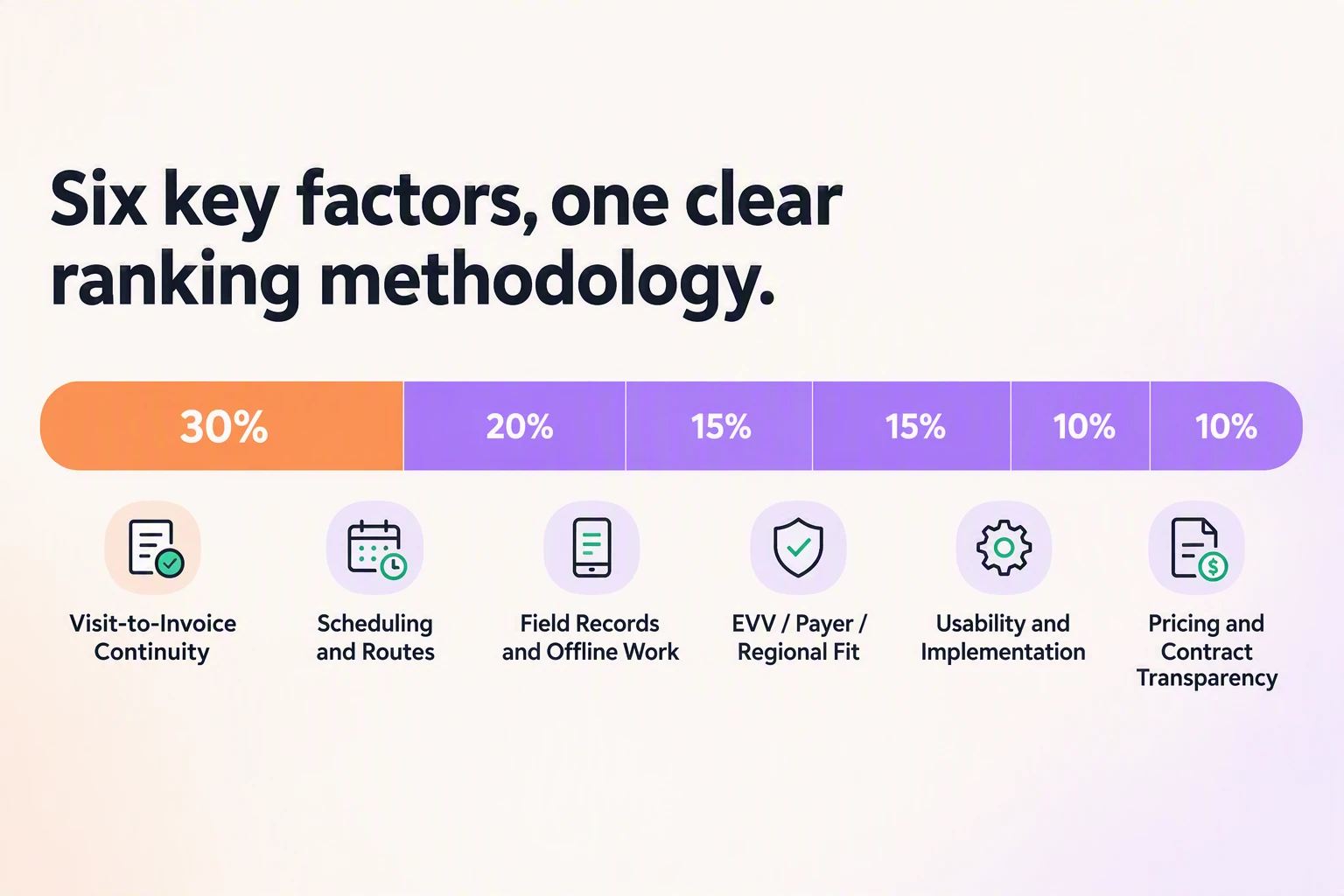
We weighted the path from assigned service to reviewed billing input most heavily. Geography changes suitability, so EVV, payer, and care-record standards were judged against each product’s stated market rather than treated as one global score.
Ranking factor | Weight | What we looked for |
|---|---|---|
Visit-to-invoice continuity | 30% | One traceable record from service setup through billing preparation |
Scheduling and routes | 20% | Recurring visits, changes, assignments, and route support where relevant |
Field records and offline work | 15% | Mobile documentation, corrections, signatures, and poor-signal handling |
EVV, payer, and regional fit | 15% | Required verification, outside connections, and local care standards |
Usability and implementation | 10% | Frontline task clarity, permissions, migration, training, and rollout work |
Pricing and contract transparency | 10% | Software, setup, support, and renewal information |
This is a research-based editorial ranking, not a claim that every platform was tested hands-on. We prioritized official product material and primary documentation, then used clearly attributed reviews to identify questions for a live demonstration.
Vendor-reported customer counts did not raise a product’s position on their own. Quote-only pricing reduced transparency, but it did not outweigh a well-documented workflow fit.
The 10 best private duty home care software platforms
The shortlist includes private-duty-first products and broader care platforms. The order reflects overall fit for the defined visit-to-invoice workflow, not universal superiority across every country or care setting.
Use the table to identify the setting fit, then read the ranked reviews for workflow detail, implementation questions, and evidence.
Product | Primary setting | Geography | Visit verification | Offline status |
|---|---|---|---|---|
Silverwise | Home care plus optional residential oversight | Confirm target market | Standard visit records; verify required EVV separately | Not established here |
PointClickCare | LTPAC, senior living, and clinical home health | North America | CellTrak EVVLink where configured | Private-duty notes unconfirmed |
MatrixCare | Private duty, home health, hospice, and LTPAC | United States | GPS or IVR with configured state connections | Documented for mobile field work |
Nourish Care | Domiciliary and residential care | United Kingdom | App, NFC, OTP, landline, or geolocation | Confirm complete offline documentation |
Nourish Empower | Visiting home care | United Kingdom and Ireland | Verify current OTP and NFC options | Confirm in the current package |
Person Centred Software | Residential and community care | United Kingdom and Australia | Confirm the configured community-care process | Confirm during frontline testing |
Netsmart myUnity | Personal care and wider post-acute services | United States | Configured GPS or telephony EVV | Confirm in the selected mobile package |
WellSky Personal Care | Multi-branch personal care | North America | GPS or IVR where configured | Offline notes unconfirmed here |
AlayaCare | Private duty, nursing, community, and disability care | Market-dependent | Verify the required market and payer path | Confirm during a poor-signal test |
AxisCare | Private-duty home care | Confirm target market | Verify the EVV and correction path | Confirm during a poor-signal test |
1. Silverwise
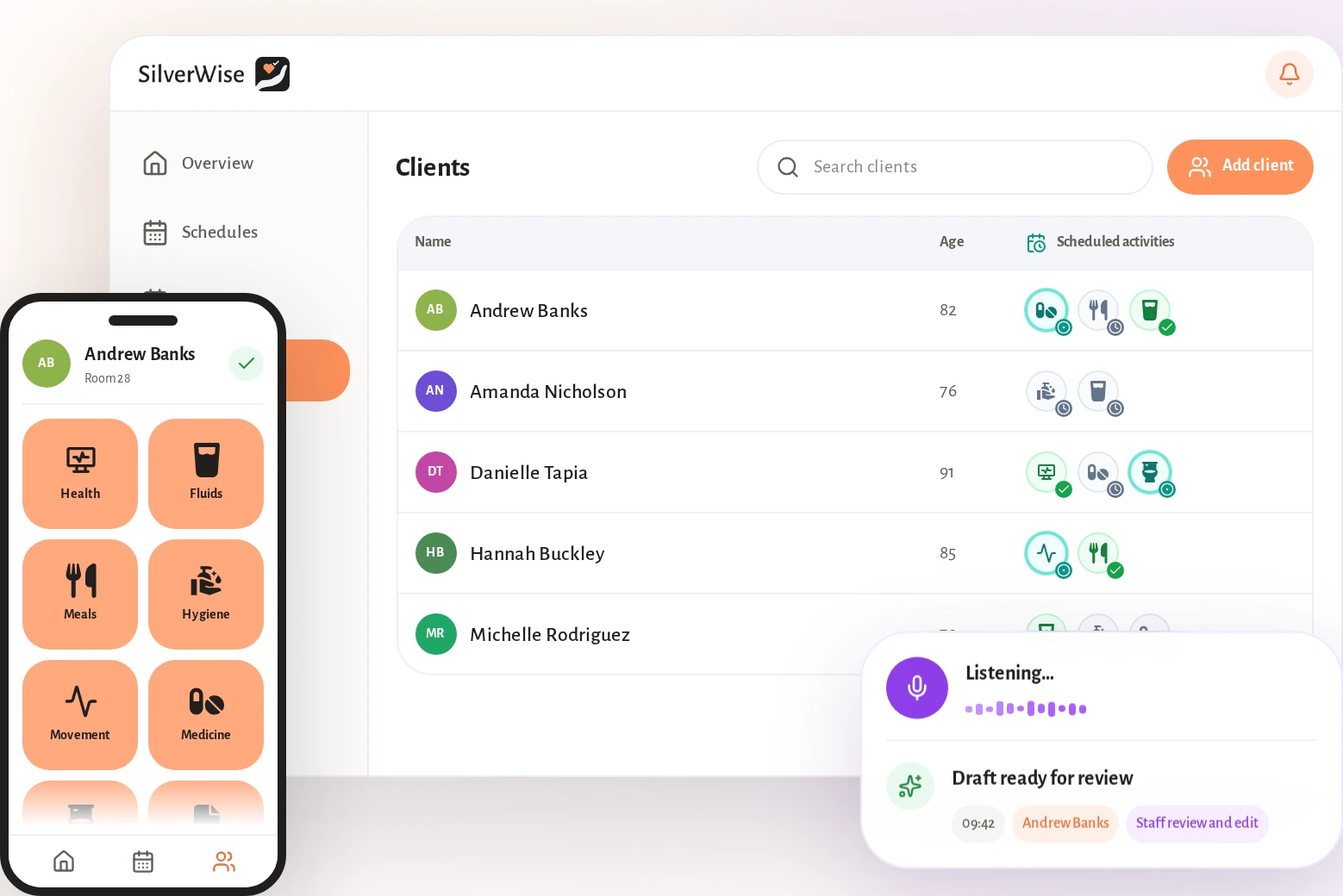
Silverwise is our first choice for private duty agencies that want service setup, schedules, routes, visit records, field updates, and billing inputs in one operational view.
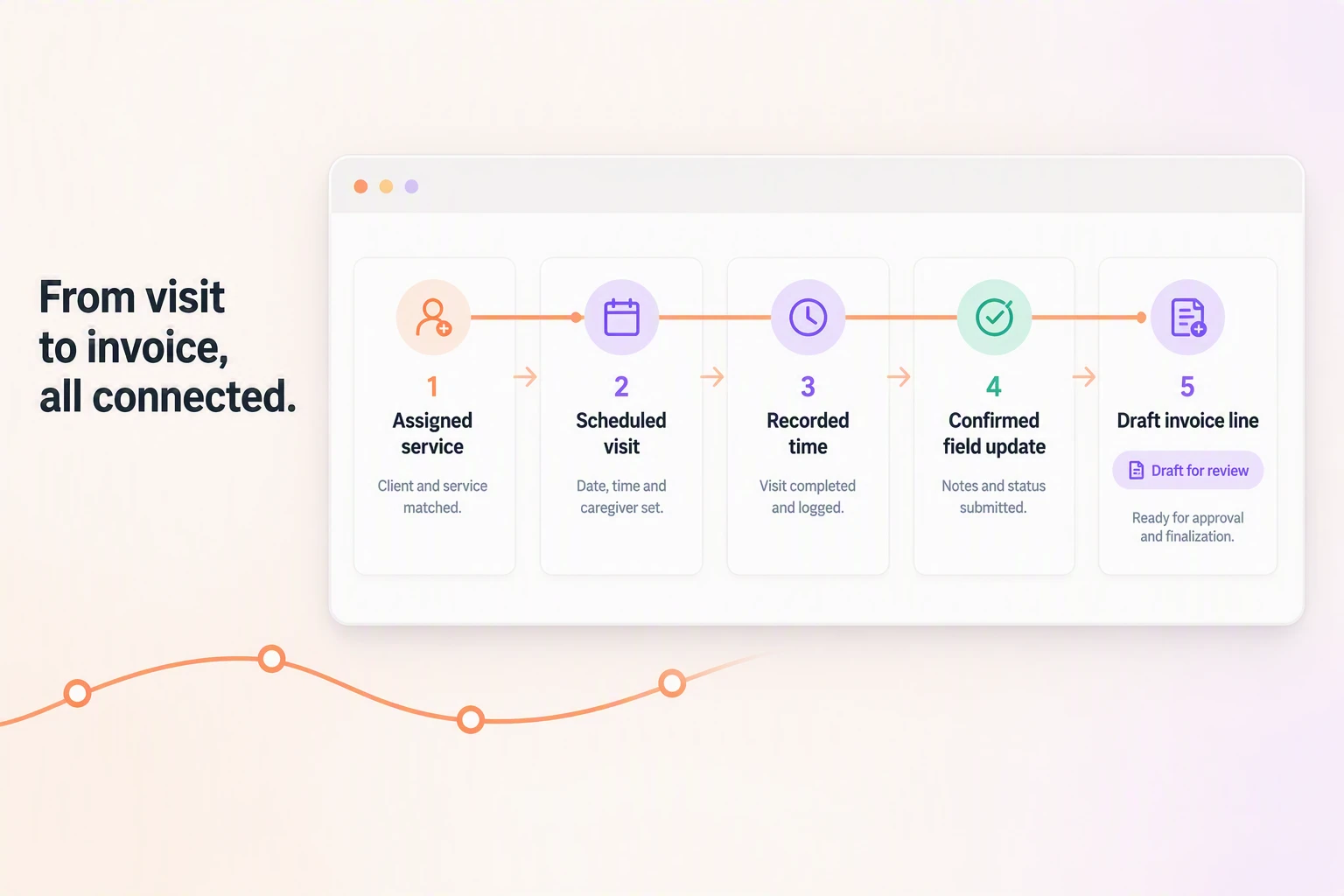
A single visit moves through five connected stages, from its assigned service to a draft invoice line.
Best for: Home care providers that want daily coordination and care documentation connected with scheduling and billing preparation.
1. Set up services and client work
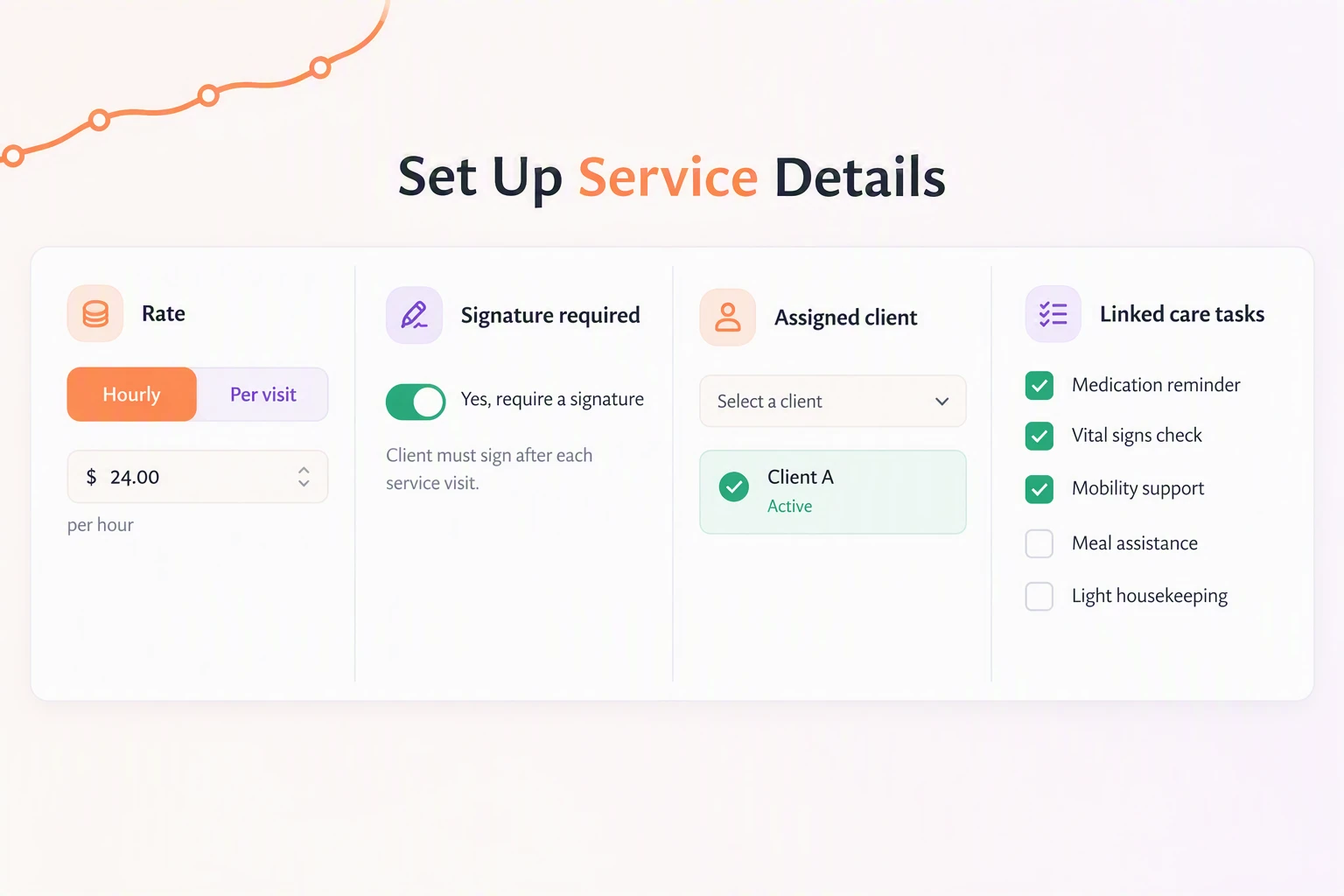
Start by defining the work your agency delivers. Silverwise keeps the service rules and client assignment together before a caregiver receives the visit.
For each service, office staff can set:
Pricing basis: Use an hourly or per-visit rate for the agency’s service.
Signature requirement: Record whether the service needs a signature.
Client assignment: Link the service to the people who receive it.
Care tasks: Connect the service with the checklist staff complete during the visit.
Hourly and per-visit figures are rates your agency sets for client services. They are separate from Silverwise platform pricing, which is available through a personalized consultation.
2. Plan schedules and routes
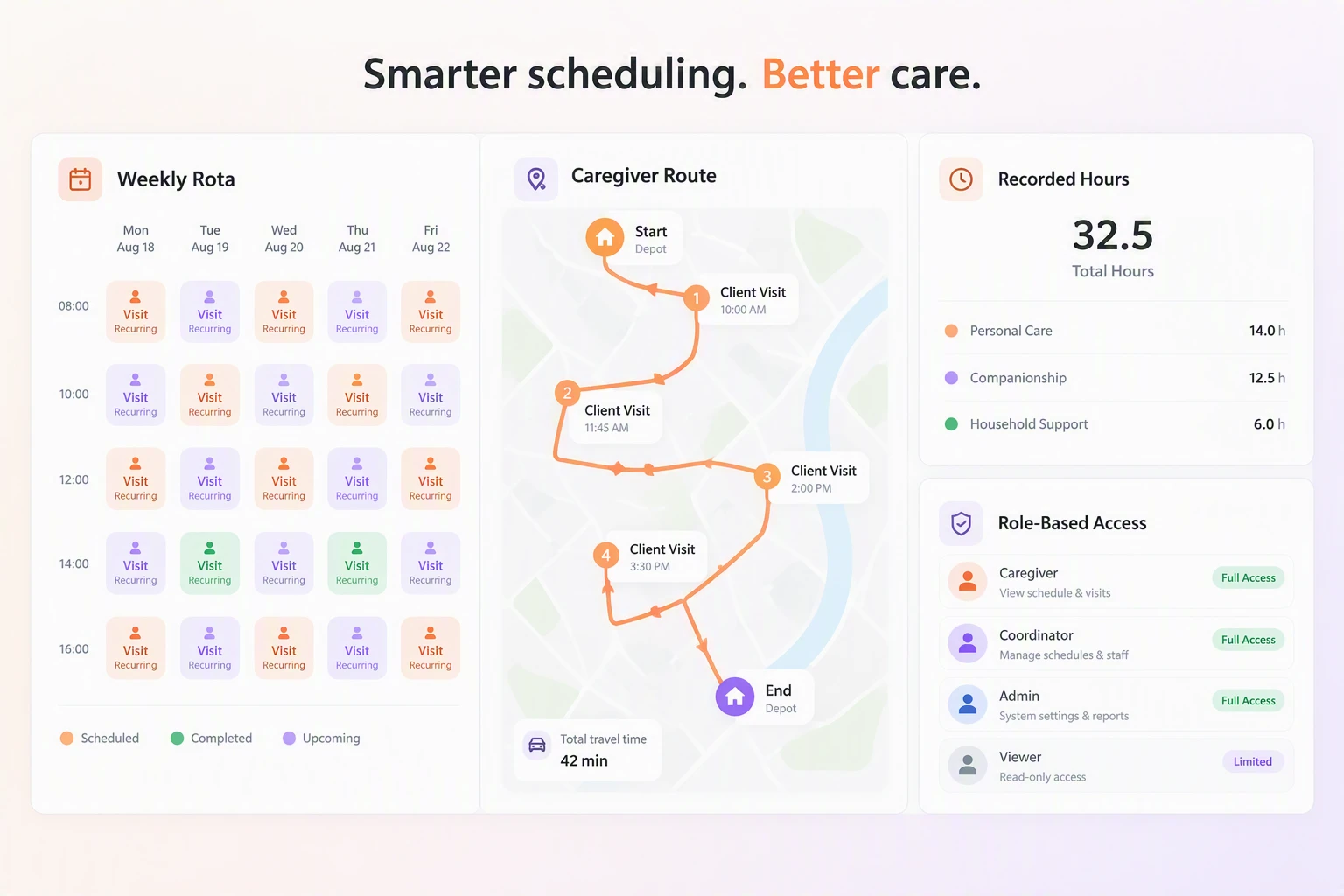
Silverwise builds monthly or annual rotas from shift templates and recurring rules. Managers can change times or reassign work in the current schedule when plans change.
Automatic route calculation helps coordinators arrange the day’s home visits. The schedule also records working hours for payroll preparation.
Before the first visit, the shared plan covers:
Shifts: Planned work, updates, and reassignments stay in the current rota.
Routes: Coordinators can calculate and optimize caregiver routes around planned visits.
Hours: Holidays, night work, and overtime remain attached to workforce records.
Access: Managers can set permissions by role, department, and active shift.
3. Record the visit in the field
Caregivers can record visit duration, delivered services, and completed care tasks while working in the field. The client’s assigned services give the visit record a clear starting point.
The record follows the work in order:
Open the assigned service and care-task checklist.
Record the time spent and services completed.
Add applicable surcharges and any field report that needs office follow-up.
Complete the visit record so the office can prepare billing inputs.
Care-plan reminders can flag scheduled work that remains overdue or incomplete. Confirmed actions stay in the client history for later review.
4. Review field updates before saving
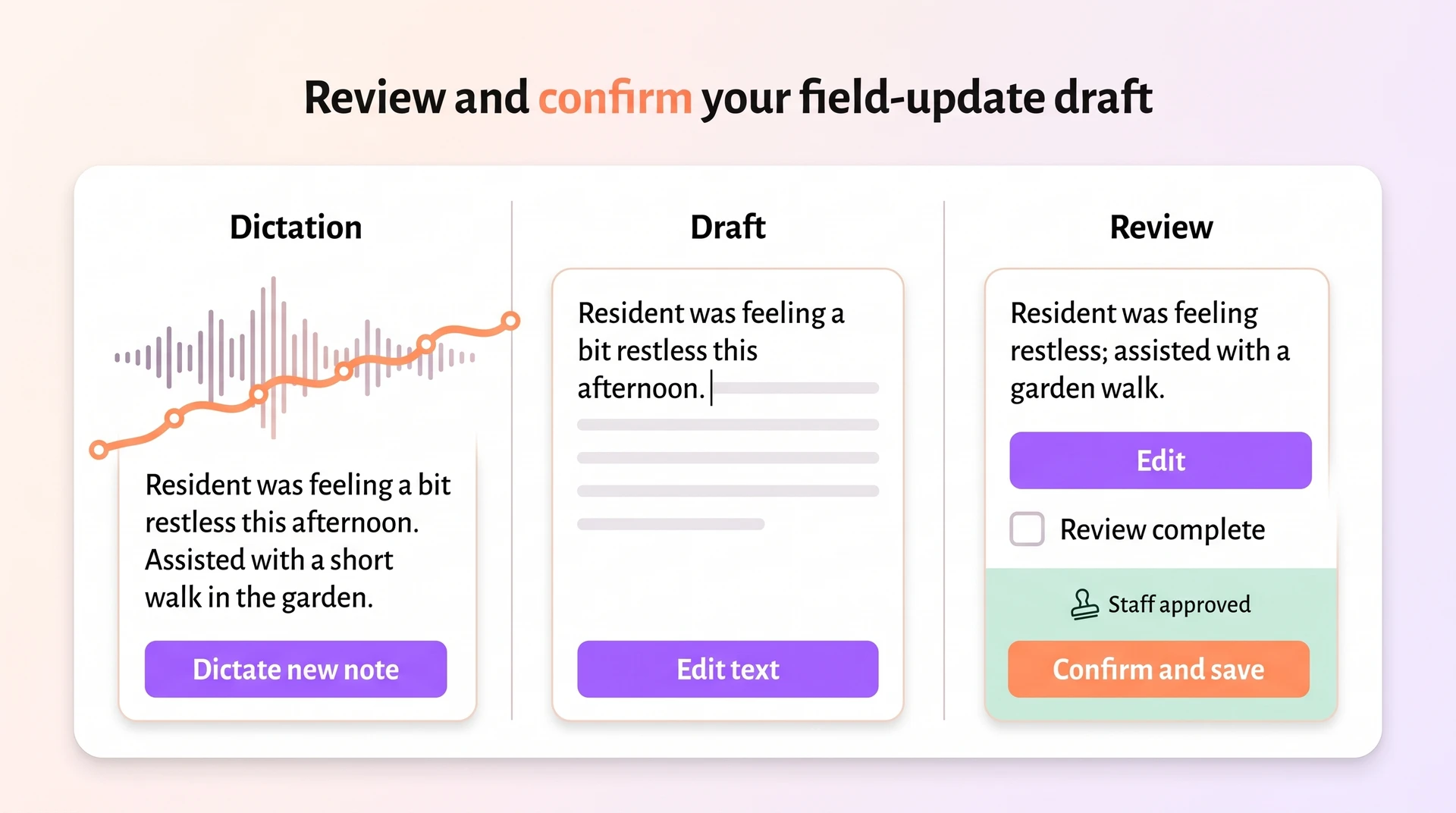
Caregivers can dictate visit observations or field updates. Silverwise prepares a structured draft for the relevant client record, and a staff member reads, edits, and confirms it before saving.
The saved entry keeps the staff member’s confirmed wording. Coordinators can review it beside field reports and targeted notices when a mobile update needs office follow-up.
5. Prepare invoice lines and follow-up
Completed visit records can become draft invoice lines from the work recorded in the field. In an illustrative 90-minute visit, the recorded duration and surcharge create one draft line for review rather than a final invoice.
Coordinators can review routes, visit times, field reports, and open work before billing moves ahead. Missing details stay visible for follow-up with the relevant caregiver.
The connected record should move in this order:
Set the service, rate, signature rule, and client assignment.
Schedule the visit and calculate the route where needed.
Record time, delivered services, care tasks, and field follow-up.
Review and confirm any drafted update before saving.
Prepare the invoice line and resolve missing details.
Optional oversight beyond the visit workflow
Silverwise also has modules for providers that manage residential services or wider facility work alongside home care:
Rooms and occupancy: Track available places, room issues, cleaning, and maintenance history.
Stock and belongings: Monitor quantities, minimum levels, care-linked use, and client items.
Files: Store resident and employee documents with permissions and expiry reminders.
Organization overview: Review care activity, staffing, planned actions, and open operational issues.
These modules can be discussed separately, so a home care agency can focus first on services, visits, routes, field updates, and invoice preparation.
For US Medicaid work, verify the required state EVV and payer connections separately. A standard visit record does not establish that fit.
2. PointClickCare

PointClickCare is a North American LTPAC EHR for skilled nursing, senior living, and clinical home health. Private-duty buyers should test how its core product and CellTrak EVVLink connect field work with office records.
Ask the vendor to demonstrate one visit from start to finish:
Send the scheduled visit to the caregiver.
Verify arrival and departure in the field.
Return the completed record to billing or payroll.
Name the PointClickCare module used for scheduling and billing, plus CellTrak EVVLink or Companion where either product forms part of the visit path.
Clinical documentation and MAR
PointClickCare is an interdisciplinary clinical record with nursing notes, orders, risk assessments, and eMAR.
Test the clinical record with the actions a private-duty caregiver must complete:
Open the current care plan.
Record an unscheduled observation.
Correct the note while preserving its history.
Confirm the appropriate eMAR information is visible.
Family access may depend on a PointClickCare package or marketplace application. Confirm which product supplies the portal, which records families can see, and how access is withdrawn.
Interdisciplinary care plans
Nursing and therapy notes
Physician orders and risk assessments
eMAR records and automated family messages
For state EVV submissions, PointClickCare uses CellTrak EVVLink rather than a PointClickCare-built GPS engine. Companion supports iOS and Android for senior living workflows, so private-duty teams should test field fit separately.
Field question | PointClickCare signal | Buyer check |
|---|---|---|
EVV submission | CellTrak EVVLink | Confirm supported state aggregators and correction handling |
Caregiver app | Companion on iOS and Android | Test private-duty tasks, signatures, and visit notes |
Offline work | Private-duty notes not confirmed | Test clock-in, documentation, and later synchronization |
Pricing and add-on costs
PointClickCare builds each quote around the organization and selected modules, so the proposal rather than a public price sheet defines the cost.
Request a proposal that separates software pricing from implementation, support, add-ons, and renewal terms.
Implementation can run from weeks to months. Ask the proposal to separate these workstreams:
Data migration and validation
Configuration and integrations
Staff training
Go-live support
A Capterra user review described cancelling Nursing Advantage and Insights because staff did not use them. Ask whether each proposed module has a named user group and renewal option.
Put these terms in writing:
Included scope: Users, records, support, and reporting.
Add-on modules: Price, dependencies, and implementation work for each module.
Renewal: Price-change rules, notice period, and contract length.
Low adoption: Rights to remove an unused module at renewal.
The Capterra review concerns a skilled-nursing deployment and its selected modules, not a private-duty agency. Validate your own module set and renewal terms rather than inferring total cost from another operator’s bill.
3. MatrixCare
MatrixCare is a cloud LTPAC EHR suite for private duty, home health, hospice, scheduling, EVV, billing, and mobile work.
Private duty sits inside a wider MatrixCare suite. Schedule personal care and a skilled-nursing visit for one client, then confirm that each task, note, and permission stays in its intended view.
Its product scope covers:
Private-duty personal care
Certified home health
Hospice
MatrixCare describes multi-payer billing and state EVV connections across its wider suite. Confirm that both are included in the private-duty configuration for the target payer and state before relying on them.
Central records and reporting
MatrixCare is a single-record suite that turns validated visits into invoices, payroll, claims, and family-visible care progress.
Mobile users can open the information needed for a scheduled visit:
Care plans and ADL tasks
Checklists and client records
Signatures
The family portal gives authorized users access to visits, care progress, and communications. Agencies should verify how quickly completed field records appear there.
A validated visit can create an invoice and a payroll entry. Payment and claims paths include:
Private pay through cards or ACH
Long-term care insurance
Medicaid and Medicare workflows with Inovalon claims tools
MatrixCare documents connections with US state EVV aggregators. Confirm that the agency’s payer, billing, and EVV connections are included in the private-duty configuration rather than assuming suite-wide availability.
MatrixCare documents iOS and Android field apps with offline work, signatures, and GPS or IVR verification. Test how an offline visit queues, synchronizes, and reaches the state aggregator.
Sandata
HHAeXchange
Tellus
In a vendor-led demonstration, correct a rejected personal-care visit with an altered arrival time, then trace the change into billing and payroll. Confirm that the state aggregator accepts the correction.
Once a completed visit reaches billing and EVV correctly, scheduling determines whether the next visit starts with the right caregiver and client context. Matching can use:
Required skills
Geography and availability
Client preferences
MatrixCare also has recurring schedules, open-shift broadcasts, and an on-call scheduler. The test case should include a late callout so the agency can see how the replacement reaches the caregiver app.
Dimension | MatrixCare | Netsmart |
|---|---|---|
Setting scope | Private duty, home health, hospice, and other LTPAC | Personal care and wider post-acute services |
Field verification | Offline mobile work, GPS, IVR, and configured state links | Configured GPS or telephony EVV |
Demonstration check | Correct a rejected visit and trace billing and payroll | Correct an exception and trace external records and billing |
Reliability and ease of use
MatrixCare uses quote-based rollout planning. Test reliability under the agency’s normal connectivity, permissions, and visit volume before launch.
Put an owner and target date beside each rollout workstream:
Data migration and validation
EVV and payer configuration
Mobile training
Go-live support
A Capterra reviewer reported recurring crashes, unexpected downtime, and delayed updates before switching from MatrixCare to PointClickCare. The same account cited missing real-time synchronization.
One reviewer’s experience does not establish current behavior for every deployment. Recreate the agency’s expected connectivity and visit volume during testing.
4. Nourish Care
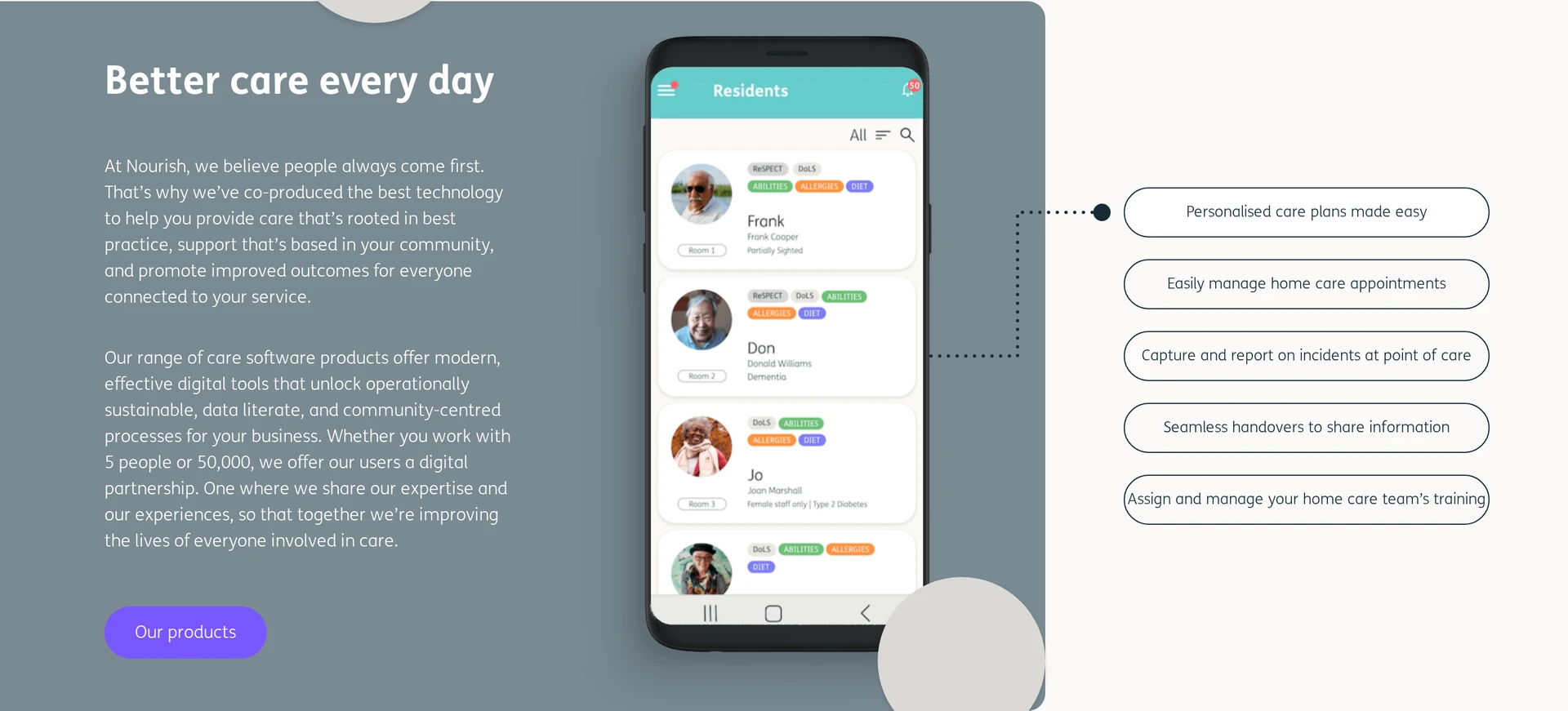
Nourish Care is a UK digital care platform for domiciliary and residential records, rostering, eMAR, and family access.
Nourish is built around UK care delivery rather than US private-duty and state EVV requirements.
UK implementation checks include:
NHS data access and GP Connect
DSCR and PRSB standards
CQC-aligned evidence
Workflow fit and interface
Nourish supports community and facility care. Nourish acquired CarePlanner in October 2023 and now presents the visiting-care operations product as Nourish Empower.
Nourish’s rostering workflow includes:
Drag-and-drop scheduling
Matching by skills and preferences
Travel-distance and break-compliance checks
For UK-commissioned visits, Nourish can record attendance through:
App start and stop with timestamps
NFC tags or OTP devices
Landline verification
Caregiver geolocation
Map a normal shift before the demonstration, then ask frontline staff to complete the same sequence in Nourish. Include a handover, a changed care task, and retrieval of an older resident note.
The care record includes:
Configurable care plans and assessments
eMAR with missed-dose alerts
Mobile notes and uploaded observations
A read-only family portal
During procurement, request current evidence for the DSCR standards, GP Connect, PRSB links, and information-security certification included in the selected package.
The family portal is read-only, so buyers should confirm which updates families can view and how access is withdrawn.
Contracts and cancellation terms
Start with the complete contract pack, then separate the commercial terms for:
Selected modules
Implementation work
Recurring charges
Settle these points before signature:
Price changes and paid add-ons
Notice periods and minimum terms
Rights to reduce seats when staffing changes
Final invoicing after cancellation
Put each answer in the order form or master agreement. Do not rely on a demonstration or sales email for a term that affects renewal or cancellation.
5. Nourish Empower (formerly CarePlanner)
Nourish Empower, formerly CarePlanner, is a visiting-care product within Nourish for UK and Irish domiciliary and supported-living providers. It centres on rotas and field records rather than residential facility operations.
The visiting-care workflow described by Nourish’s CarePlanner page covers four areas:
Rota planning: Teams can build recurring care runs and assign carers against agency rules.
Field access: Mobile access routes carers into visit records.
Local connectivity: Confirm the current local-authority and API connections in the Empower package.
Finance handoff: Confirm how completed service information reaches payroll and accounting.
Scheduling and process fit
CarePlanner matches carers to recurring care runs by skills, availability, proximity, and travel windows.
Agency rules can also account for:
Stated carer and client preferences
Working-hour limits
Ask Nourish to demonstrate whether current Empower visit records remain available in poor mobile coverage, what carers can complete offline, and how entries synchronize when connectivity returns.
In the current Empower demonstration, verify whether the selected package includes:
Visit start and stop verification
Time-based OTP codes and NFC tags
Care plans and handovers
eMAR recording
Agree escalation times, named support ownership, and the process for problems that block a live visit. Put those responsibilities in the implementation plan and contract.
Nourish Empower is aligned with UK and Irish community-care workflows. A US Medicaid-funded agency would need separate confirmation of state EVV, payer, and privacy requirements.
No public Empower rate appears in the reviewed product material. Ask for one written total covering active service users, onboarding, training, integrations, and the full contract period.
Active service-user count
Onboarding
Training
Annual or multi-year contract terms
6. Person Centred Software
Person Centred Software is a modular care-record platform sold in the UK and Australia. It spans residential and community care, so the selected modules shape the day-to-day workflow.
mCare is the frontline recording layer. Icons and speech-to-text reduce keyboard entry, including for non-native speakers and staff with dyslexia.
The wider care-record stack can include:
Care planning: Digital care plans, body maps, and alerts keep current needs available on handheld devices.
Medication and handover: eMAR and digital handovers connect routine recording between shifts.
Family access: The Family Engagement Module can give approved family members access to care information and shared updates. Confirm which records are visible and how access is withdrawn.
Connected records: NHS-linked care records and other integrations depend on the configured deployment.
Wider modules: Training and compliance tools can sit alongside the care record.
Deployment scope can differ sharply between a nursing home and a domiciliary provider. Supported-living teams should also check how permissions follow staff across people and locations.
Regional questions belong in the procurement record:
UK: Which NHS connections and local integrations are included for the service?
Australia: Which local integrations, support hours, and compliance modules form part of the package?
Every deployment: Which handheld devices, offline processes, and role permissions have been tested with frontline staff?
Pricing and contract
Quotes vary by selected modules and bed or service-user count. Request the complete recurring and implementation cost for the intended UK or Australian deployment.
Ask for the exact annual increase formula and minimum term in writing, alongside:
Recurring module charges
Setup and data-migration fees
Integration costs
Renewal and cancellation terms
7. Netsmart
Netsmart myUnity is an enterprise post-acute EHR that connects personal care, home health, hospice, EVV, billing, and cross-setting records.
Netsmart’s defining context is US interoperability across post-acute settings. Verify which external records move through the configured exchange, how failed transfers appear, and who owns each interface.
For Netsmart's US cross-setting workflow, run the following four-task trace to see how field EVV connects to external records and billing.
Document a personal-care or home-health visit in the field.
Correct an EVV exception without losing the original record.
Retrieve relevant information from another care setting.
Pass the completed service record into billing.
Run the trace with a coordinator and field worker, without vendor guidance. Record screen changes, help requests, and stalled steps for each role.
Capture what creates implementation work during that test:
Screens: Count the screens required for each task.
Permissions: Note every role or interface change.
Ownership: Assign an owner to each interface in the launch scope.
Cost and implementation
Budgeting for myUnity begins with a custom enterprise quote because no public starting rate is established in the reviewed material.
The written myUnity scope should separate:
Platform licensing and selected modules
Implementation, migration, and training
Interfaces, maintenance, and support
Renewal rules and ongoing ownership
8. WellSky
WellSky Personal Care is a private-duty platform for multi-branch scheduling, EVV, point-of-care records, and analytics.
Its scheduling scope includes:
Multi-office calendars: Coordinators can view and adjust schedules across office locations.
Caregiver matching: Automated matching narrows assignments using configured criteria.
Shift coverage: Teams can create ad-hoc shifts and notify caregivers about open work.
Hours control: Overtime warnings appear before assignment.
Conflict checks: Real-time checks flag scheduling conflicts.
Trace one visit across branch scheduling, EVV correction, the point-of-care record, and billing or payroll export. The rollout plan should also name owners for migration, training, and go-live support.
Compare WellSky only after the quote separates the software license, configured modules, implementation work, support, and renewal obligations. No public Personal Care rate is established here.
9. AlayaCare
AlayaCare is an enterprise home care EHR for private duty, nursing, community, and disability providers. It is built for organizations that coordinate several service lines and back-office processes.
Use these areas to structure the evaluation:
Run one recurring visit from scheduling through the caregiver’s mobile record, an EVV exception, and the billing or payroll handoff. Repeat the visit without a reliable connection and inspect the synchronized record.
AlayaCare serves several markets, so verify the required payer, funding, EVV, portal, and integration path for the agency’s country. Do not infer one region’s rollout or verification model from another.
Daily operations: Trace scheduling, mobile visit records, and a late assignment change.
Business systems: Follow a completed visit into financial tools, portals, APIs, and required outside systems.
Record control: Confirm permissions, correction history, and staff review for any assisted documentation.
Use these checks to compare AlayaCare with the shorter AxisCare entry below:
Item | AlayaCare | AxisCare |
|---|---|---|
Rollout | Scope-specific discovery, configuration, testing, training, and stabilization | Confirm scope, owners, training, and go-live support |
Field test | Schedule, mobile record, poor-signal work, EVV exception, and finance handoff | Schedule, late change, EVV correction, visit record, and invoice handoff |
Pricing | Custom quote; separate onboarding and integrations | Confirm public-price status and quote basis |
10. AxisCare
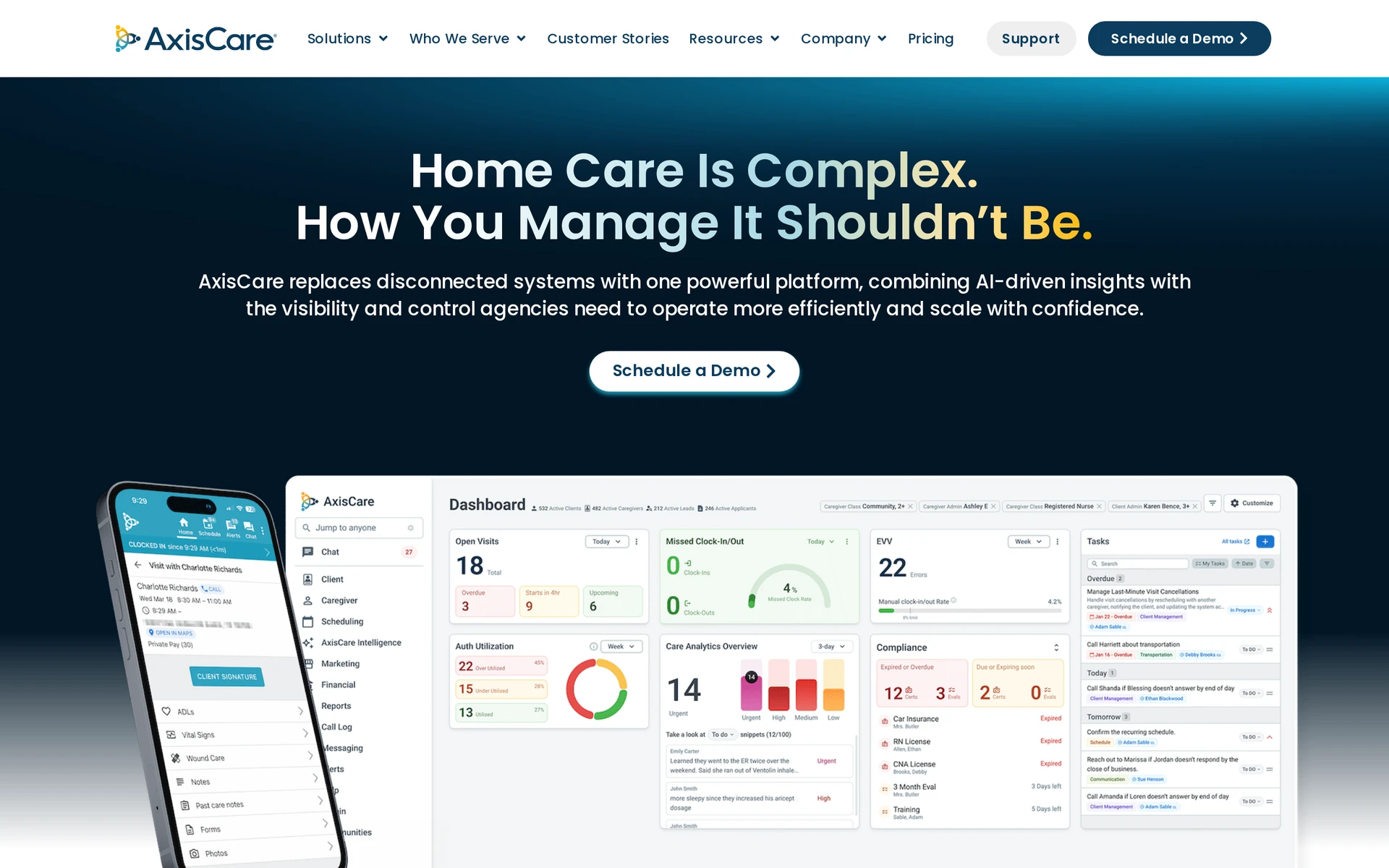
AxisCare is a home care platform for private-duty agencies evaluating scheduling, visit records, EVV, billing, and rollout. Confirm its market, payer connections, mobile workflow, and quote basis for the intended agency.
Run a scheduled visit with a late caregiver change, then:
Confirm the updated assignment reaches the caregiver.
Record arrival, departure, delivered care, and an EVV correction.
Follow the completed record into billing or payroll without rekeying it.
Record the implementation work, training, and data preparation the quote includes.
Compare commercial status alongside the workflow test:
Tool | Public price status | What to request |
|---|---|---|
AxisCare | Confirm with the vendor | Quote basis, included users or clients, setup, support, and renewal |
AlayaCare | Custom quote | Onboarding, integrations, market scope, and rollout phases |
MatrixCare | No official list price established here | Modules, EVV and payer setup, migration, training, and renewal |
Private duty home care software compared
Private-duty products serve different regulatory and funding contexts. US buyers may need state EVV and payer links, UK and Irish buyers need local care-record and commissioning fit, and Australian buyers need region-specific integrations and support.
Nourish Care and Nourish Empower are two related products from one vendor group. Compare all ten products by jurisdiction, service model, visit workflow, and required outside connections.
Decision | Evidence to request | Status to record | Failure sign |
|---|---|---|---|
Geography and setting | Supported country, care model, payer, and regulator | Confirmed or out of scope | Sales material does not match the intended service |
Visit verification | Arrival, departure, correction, signature, and required EVV transfer | Pass, partial, or fail | A correction loses history or needs rekeying |
Offline field work | Complete one visit in poor signal and synchronize it later | Full, limited, or unavailable | Notes, times, or signatures do not return intact |
Interoperability | Send one record through each required outside connection | Native, partner, export, or manual | Failed transfers are hidden or unowned |
Price and contract | Comparable scope for software, setup, support, and renewal | Known or unknown | Key modules or obligations remain outside the quote |
Visit verification and interoperability are separate checks. Trace one completed visit from the caregiver’s device into the office record and every required outside system.
Offline capability should cover visit completion as well as rota access. Run the test on the devices caregivers will use, under the same permissions they will have.
Treat an undisclosed price as unknown. Compare written quotes against the same agency size, modules, implementation work, and contract period.
What to check before you choose a platform
Ask one frontline caregiver and one office coordinator to run a real service from setup to invoice preparation without vendor guidance. Mark each step pass, partial, or fail, and name the owner of every workaround.
Treat duplicate entry, manual rekeying, lost record history, or an unowned failed transfer as a fail rather than a minor inconvenience.
Set up one service: Create an hourly or per-visit service, assign it to a client, and add any task or signature requirement.
Build the schedule: Add a recurring visit, make a callout change, and confirm that office staff and the caregiver see the same rota.
Check routes and field access: If route planning matters, open the route on the caregiver’s device. Repeat the visit test with a weak connection under normal permissions.
Complete the visit record: Capture the visit times and care delivered, then correct an entry without losing its history.
Review assisted documentation: If the platform drafts notes from speech, confirm that staff can edit the draft and must approve it before saving.
Test EVV and outside links: For US Medicaid work, map every required EVV field to the relevant aggregator and test an exception or rejected transfer.
Prepare an invoice: Follow confirmed time and services into an invoice line or billing export, without assuming the platform submits payer claims.
Add residential checks only when needed: Providers that also operate homes can test occupancy and room work, then add stock controls if care actions should adjust supplies.
Plan the cutover: Assign owners for data preparation and staff training, use a phased rollout, and keep a fallback process during live shifts.
The best platform is the one that carries a normal visit through service setup, scheduling, field recording, review, and invoice preparation without hidden handoffs. Residential rooms, stock, and occupancy should remain optional checks for providers that need them.
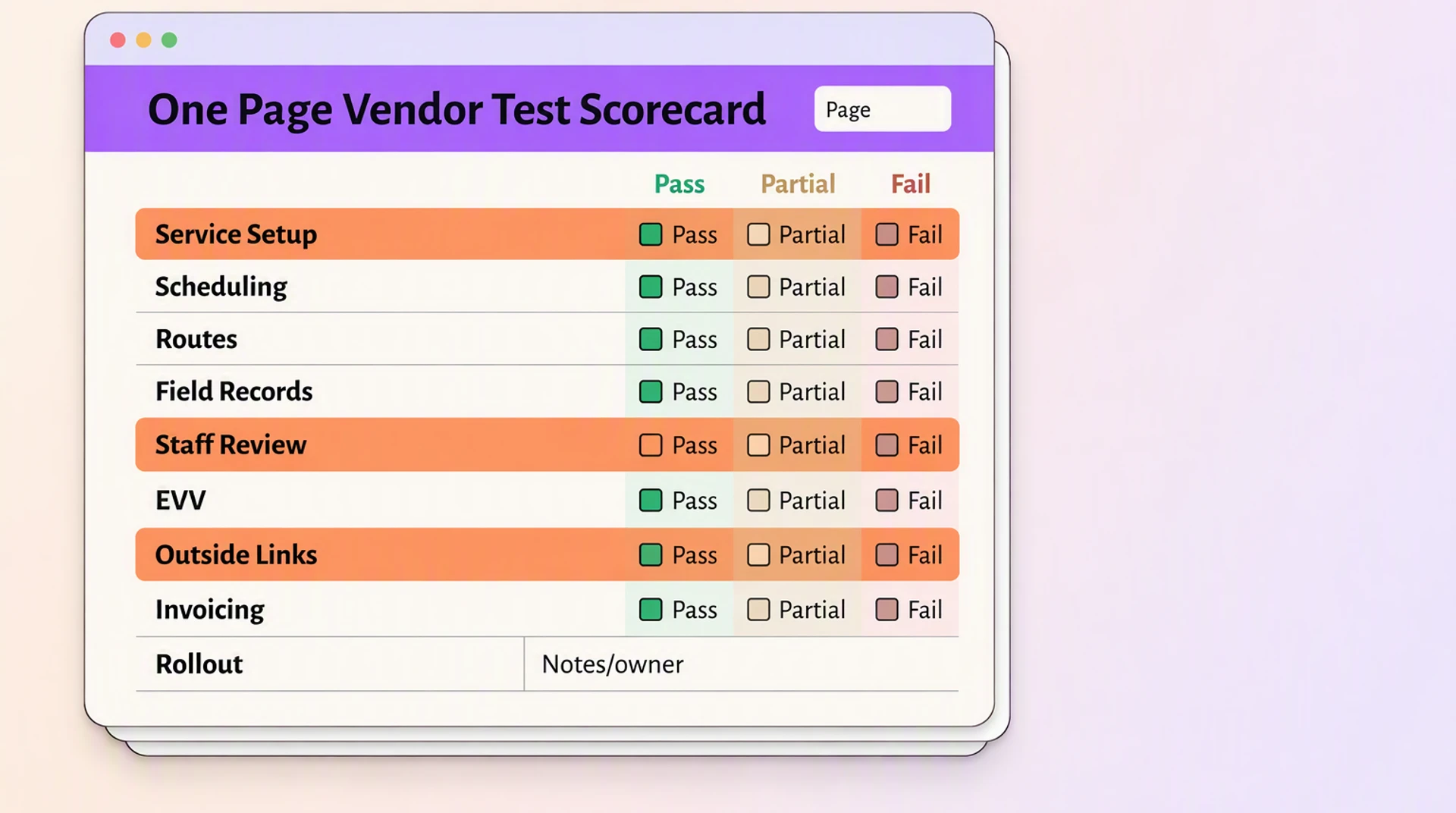
Before signing, run the workflow with the people who will use it. Their test will show whether the system supports care work or creates another place to reconcile.
See how Silverwise fits your visit workflow
Silverwise brings the evaluation criteria in this guide into one home care workflow. Your team can test how a visit moves from assigned services and schedules through field records, review, and invoice preparation.
Start with one normal visit and let a coordinator and caregiver test every handoff. If the record stays clear from office planning through billing preparation, you have a practical basis for a wider rollout.
What should a private duty agency test before choosing software?
Run one normal visit from service setup through scheduling, field recording, review, and invoice preparation. Include a late change, weak mobile signal, and any required EVV or outside-system transfer.
How does Silverwise connect a home care visit with billing preparation?
Silverwise keeps the assigned service, schedule, route, visit time, completed work, and field follow-up connected. Office staff can review the record and prepare a draft invoice line without treating the visit as a separate workflow.
Does Silverwise replace staff review when it drafts a field update?
No. Silverwise prepares a structured draft from the caregiver’s spoken update, but a staff member reads, edits, and confirms the wording before the record is saved.
Can Silverwise also support providers that operate care homes?
Yes. Providers can discuss optional modules for rooms, occupancy, stock, belongings, files, and wider operational oversight while keeping the home care visit workflow central.
Does Silverwise provide EVV for US Medicaid visits?
A standard Silverwise visit record does not establish state EVV or payer fit. US Medicaid providers should verify every required state connection, correction path, and transfer separately before choosing a platform.
:no_upscale())